From RTL to GDSII
To start the project you first need to create a new repository based on the caravel_user_project template and make sure your repo is public and includes a README.
Follow https://github.com/efabless/caravel_user_project/generate to create a new repository.
Clone the reposity using the following command:
git clone <your github repo URL>
To setup your local environment run:
cd <project_name> # project_name is the name of your repo

# export the PDK variant depending on your shuttle, if you don't know leave it to the default

# for sky130 MPW shuttles....
export PDK=sky130A

# for the gf180 GFMPW shuttles...
export PDK=gf180mcuC


make setup
This command will setup your environment by installing the following: - caravel_lite (a lite version of caravel), - management core for simulation, - openlane to harden your design, - pdk.
DES Without Trojan Insertion
Now you can start hardening your design
To start hardening you project you need:
RTL verilog model for your design for OpenLane to harden, The DES algorithm can be found at: https://opencores.org/projects/des
The verilog files must be located in the directory
verilog/rtl/DES/mkdir verilog/rtl/DESA subdirectory for each macro in your project under
openlane/directory, each subdirectory should include openlane configuration files for the macro.
mkdir openlane/DES
touch openlane/DES/config.json
The config.json file required for the execution of the RTL-to-GDSII flow for the DES algorithm encompasses the following crucial settings:
{
 "DESIGN_NAME": "des",
 "VERILOG_FILES": [
     "dir::../../verilog/rtl/defines.v",
     "dir::../../verilog/rtl/DES/crp.v ",
     "dir::../../verilog/rtl/DES/des.v ",
     "dir::../../verilog/rtl/DES/key_sel.v ",
     "dir::../../verilog/rtl/DES/sbox1.v ",
     "dir::../../verilog/rtl/DES/sbox3.v ",
     "dir::../../verilog/rtl/DES/sbox5.v ",
     "dir::../../verilog/rtl/DES/sbox7.v",
     "dir::../../verilog/rtl/DES/des3.v ",
     "dir::../../verilog/rtl/DES/key_sel3.v ",
     "dir::../../verilog/rtl/DES/sbox2.v ",
     "dir::../../verilog/rtl/DES/sbox4.v ",
     "dir::../../verilog/rtl/DES/sbox6.v ",
     "dir::../../verilog/rtl/DES/sbox8.v"
 ],
 "ROUTING_CORES": 24,
 "CLOCK_PERIOD": 25,
 "CLOCK_PORT": "clk",

 "MAX_TRANSITION_CONSTRAINT": 1.5,
 "FP_PDN_VPITCH": 180,
 "FP_PDN_HPITCH": 180,
 "FP_PDN_VOFFSET": 5,
 "FP_PDN_HOFFSET": 5,
 "FP_SIZING": "absolute",
 "RT_MAX_LAYER": "met4",
     "DIE_AREA": "0 0 350 350",
 "VDD_NETS": [
     "vccd1"
 ],
 "GND_NETS": [
     "vssd1"
 ]

}
Execute the following command to harden the DES project
make DES
Upon executing the previous command, provided everything is functioning as expected, you should encounter the message “[SUCCESS]: Flow complete”. In such a case, navigate to the directory openlane/DES/runs/<Execution_Date>. Inside this directory, you will locate the folder containing the comprehensive reports and files generated by OpenLane. Among these files, you’ll find the GDSII file, which is visually represented in Fig. 6.1, displaying the GDS representation, and the resources utilized by the DES system’s implementation.

Fig. 6.1: GDSII file of the DES algorithm without Trojan insertion.
DES With Trojan Insertion
To get the layout design with the Trojan, it is imperative to establish a new directory that accommodates the files created and altered by the artificial intelligence (AI).
mkdir verilog/rtl/DES_Trojan
mkdir openlane/DES_Trojan
touch openlane/DES_Trojan/config.json
The config.json file required for the execution of the RTL-to-GDSII flow for the DES_Trojan algorithm encompasses the following crucial settings:
{
  "DESIGN_NAME": "des_Trojan",
  "DESIGN_IS_CORE": 0,
  "VERILOG_FILES": [
      "dir::../../verilog/rtl/defines.v",
      "dir::../../verilog/rtl/DES_Trojan/*.v"
  ],
  "ROUTING_CORES": 24,
  "CLOCK_PERIOD": 25,
  "CLOCK_PORT": "clk",

  "MAX_TRANSITION_CONSTRAINT": 1.5,
  "FP_PDN_VPITCH": 180,
  "FP_PDN_HPITCH": 180,
  "FP_PDN_VOFFSET": 5,
  "FP_PDN_HOFFSET": 5,
  "FP_SIZING": "absolute",
  "RT_MAX_LAYER": "met4",
   "DIE_AREA": "0 0 500 500",
  "VDD_NETS": [
      "vccd1"
  ],
  "GND_NETS": [
      "vssd1"
  ]

}
Upon executing the previous command, provided everything is functioning as expected, you should encounter the message “[SUCCESS]: Flow complete”. In such a case, navigate to the directory openlane/DES_Trojan/runs/<Execution_Date>. Inside this directory, you will locate the folder containing the comprehensive reports and files generated by OpenLane. Among these files, you’ll find the GDSII file, which is visually represented in Fig. 6.2, displaying the GDS representation of the resources utilized by the DES_Trojan system’s implementation.

Fig. 6.2: GDSII file of the DES algorithm with Trojan insertion.
AES Without Trojan Insertion
Now you can start hardening your design
To start hardening you project you need:
RTL verilog model for your design for OpenLane to harden, The AES algorithm can be found at: https://opencores.org/projects/systemcaes
The verilog files must be located in the directory
verilog/rtl/AES/mkdir verilog/rtl/AESA subdirectory for each macro in your project under
openlane/directory, each subdirectory should include openlane configuration files for the macro.
mkdir openlane/AES
touch openlane/AES/config.json
The config.json file required for the execution of the RTL-to-GDSII flow for the DES algorithm encompasses the following crucial settings:
{
 "DESIGN_NAME": "aes",
 "VERILOG_FILES": [
     "dir::../../verilog/rtl/defines.v",
     "dir::../../verilog/rtl/AES/*.v"
 ],
 "ROUTING_CORES": 24,
 "CLOCK_PERIOD": 25,
 "CLOCK_PORT": "clk",

 "MAX_TRANSITION_CONSTRAINT": 1.5,
 "FP_PDN_VPITCH": 180,
 "FP_PDN_HPITCH": 180,
 "FP_PDN_VOFFSET": 5,
 "FP_PDN_HOFFSET": 5,
 "FP_SIZING": "absolute",
 "RT_MAX_LAYER": "met4",
     "DIE_AREA": "0 0 400 400",
 "VDD_NETS": [
     "vccd1"
 ],
 "GND_NETS": [
     "vssd1"
 ]

}
Execute the following command to harden the AES project
make AES
Upon executing the previous command, provided everything is functioning as expected, you should encounter the message “[SUCCESS]: Flow complete”. In such a case, navigate to the directory openlane/AES/runs/<Execution_Date>. Inside this directory, you will locate the folder containing the comprehensive reports and files generated by OpenLane. Among these files, you’ll find the GDSII file, which is visually represented in Fig. 6.3, displaying the GDS representation, and the resources utilized by the AES system’s implementation.

Fig. 6.3: GDSII file of the AES algorithm without Trojan insertion.
AES With Trojan Insertion
To get the layout design with the Trojan, it is imperative to establish a new directory that accommodates the files created and altered by the AI.
mkdir verilog/rtl/AES_Trojan
mkdir openlane/AES_Trojan
touch openlane/AES_Trojan/config.json
The config.json file required for the execution of the RTL-to-GDSII flow for the AES_Trojan algorithm encompasses the following crucial settings:
{
 "DESIGN_NAME": "aes_Trojan",
 "DESIGN_IS_CORE": 0,
 "VERILOG_FILES": [
     "dir::../../verilog/rtl/defines.v",
     "dir::../../verilog/rtl/AES_Trojan/*.v"
 ],
 "ROUTING_CORES": 24,
 "CLOCK_PERIOD": 25,
 "CLOCK_PORT": "clk",

 "MAX_TRANSITION_CONSTRAINT": 1.5,
 "FP_PDN_VPITCH": 180,
 "FP_PDN_HPITCH": 180,
 "FP_PDN_VOFFSET": 5,
 "FP_PDN_HOFFSET": 5,
 "FP_SIZING": "absolute",
 "RT_MAX_LAYER": "met4",
 "DIE_AREA": "0 0 650 650",
 "PL_TARGET_DENSITY":0.66,

 "VDD_NETS": [
     "vccd1"
 ],
 "GND_NETS": [
     "vssd1"
 ]

}
Upon executing the previous command, provided everything is functioning as expected, you should encounter the message “[SUCCESS]: Flow complete”. In such a case, navigate to the directory openlane/AES_Trojan/runs/<Execution_Date>. Inside this directory, you will locate the folder containing the comprehensive reports and files generated by OpenLane. Among these files, you’ll find the GDSII file, which is visually represented in Fig. 6.4, displaying the GDS representation of the resources utilized by the AES_Trojan system’s implementation.
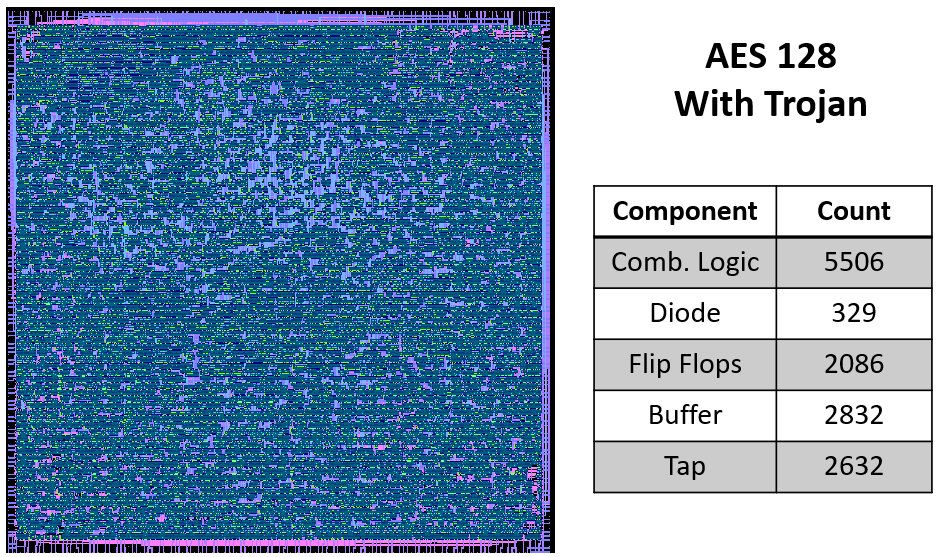
Fig. 6.4: GDSII file of the AES algorithm with Trojan insertion.